
Lesson 3: Building a Reliable MT5 Research Environment
Platform, Demo Account and Execution Setup for Quantitative Strategy Testing
Before a quantitative strategy can be tested properly, the research environment needs to be understood.
A trading algorithm does not operate in isolation: market data, account specifications, platform settings, server connection and execution rules all influence what the program can observe and how it can act.
This lesson uses MetaTrader 5 (MT5) as a practical example. The objective is not to select a particular broker or encourage live trading. Instead, it shows how to create a controlled demo environment in which strategy logic, platform behaviour and execution assumptions can be examined more systematically.
A reliable research setup should make the strategy easier to test, reproduce and diagnose—not simply easier to place orders.

1. Why Platform Setup Matters in Quant Trading
Quantitative research depends on repeatability.
If two tests use different symbols, account modes, contract specifications, leverage assumptions or server settings, their results may not be directly comparable. Platform configuration therefore becomes part of the experimental setup.
For an MT5-based workflow, four elements should be separated clearly:
Trading platform: The software environment used to view data, run programs and send trading instructions.
Broker and trade server: The infrastructure that supplies account-specific prices, symbols and execution rules.
Trading account: The demo or live account configuration that determines balance, currency, leverage and position mode.
Expert Advisor (EA): The program that evaluates predefined rules within the platform and account environment.
2. Choose a Research Environment Before Comparing Performance
For quantitative testing, the most useful platform is not necessarily the one with the most attractive headline spread or highest leverage.
The first question is whether the environment is transparent enough to understand and reproduce.
Before using an account for EA research, record:
The legal entity and server
Symbol specifications
Account currency
Position mode
Trading hours
Minimum volume
Volume step
Margin settings
Relevant trading costs
These details can affect both backtests and forward observations.
Execution Conditions Are Research Inputs
Spread, commission, slippage, filling mode, rejected orders and gaps are not merely operational details.
They can change the realised behaviour of a strategy, particularly when the system trades frequently or targets relatively small price movements.
A demo account can help test platform behaviour and EA compatibility, but it cannot prove that live execution conditions will be identical.
3. Create a Demo Workspace
A demo account uses virtual funds and is useful for:
Learning the platform
Checking symbol specifications
Placing test orders
Observing an EA without committing real capital
Availability, expiry and account options vary by provider, so the research notes should record the specific server and account configuration used.
Step 1 — Open the Account Wizard
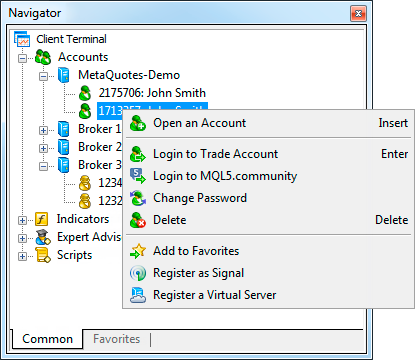
In the MT5 desktop terminal, the account wizard can be opened from:
File → Open an Account
It can also be accessed by right-clicking Accounts in the Navigator panel and selecting Open an Account.
Step 2 — Select the Intended Company and Demo Server
Search using the exact company or server information obtained from a verified source.
The server matters because login credentials are tied to a specific destination. Choosing a similarly named but different server can prevent connection or produce a different testing environment.

Step 3 — Choose a Demo Account
Select the demo-account option so that the setup uses virtual funds.
At this stage, the goal is to create a controlled environment for platform practice and strategy testing rather than a funded trading account.

4. Configure the Demo Account for Meaningful Testing
A demo account becomes more useful when its settings resemble the conditions the strategy is intended to study.
Unrealistically large balances or extreme leverage can hide weaknesses in position sizing and margin management.
Step 4 — Record the Key Account Parameters
Account type and server: Confirm that the selected environment supports the instruments and position mode required by the strategy.
Virtual balance and currency: Choose a test balance that makes risk and sizing behaviour easy to interpret rather than automatically choosing the largest available amount.
Leverage: Treat leverage as an account constraint and margin parameter, not as a performance target.
Hedging or netting: Confirm which position-accounting model is active because an EA may be designed for one mode and behave differently in the other.
Agreements and permissions: Read the relevant account terms and understand what the platform is authorised to do before enabling automated functions.

5. Credentials Are Part of the Operational Setup
After account creation, MT5 provides the details required to reconnect.
In a research workflow, these details should be stored securely, and the exact server should be documented alongside the strategy configuration.
Login: The numeric account identifier.
Master password: A credential that permits trading and account actions. It should remain private.
Investor password: A read-only credential intended for viewing rather than order placement. It is still private account information.
Server: The exact trade server associated with the account. A correct login and password can still fail when the wrong server is selected.
QR code: A sign-in credential that should be treated as sensitive and excluded from public screenshots or course materials.

Before uploading this image to Wix, obscure every login number, password and QR code—even if the account is only a demo account or the details are described as samples.
Do not publish master passwords, investor passwords or QR codes in screenshots, shared research notes or website content.
6. Reconnect and Verify the Test Environment
A newly created account may connect automatically.
To reconnect later, use:
File → Login to Trade Account
Alternatively, use the corresponding option in Navigator. Enter the saved login, master password and exact server.

Research Environment Checklist
The intended demo account is active in Navigator.
Prices are updating and the terminal shows an active data connection.
Toolbox displays a virtual balance and equity.
The required symbol is visible in Market Watch.
Contract size, minimum volume, volume step and trading hours have been recorded.
The hedging or netting mode matches the EA design.
The correct account is active before an EA or forward test is started.
7. Demo Results and Live Results Are Not the Same Thing
A demo environment is valuable for functional testing, but it should not be treated as evidence of live profitability or execution quality.
Demo fills, spreads, liquidity behaviour and operational conditions may differ from those encountered in a funded account.
For quantitative research, demo monitoring is best used to answer questions such as:
Does the EA receive data correctly?
Are signals generated at the expected time?
Are orders formatted correctly?
Do the logs show errors?
Does the strategy respond to account and symbol settings as designed?
8. Common Setup Problems
Broker or Server Cannot Be Found
Recheck the exact name or server information. Some providers require demo registration through their own portal.
Invalid Account
Check the server first, then the login and password. Demo access may also expire according to provider policy.
No Quotes or Connection
Check internet connectivity, terminal connection status and Journal messages before assuming the EA is faulty.
Account Exists but Is Not Shown
Reconnect manually using the saved account details.
EA Behaves Differently Across Accounts
Compare symbol specifications, position mode, leverage, trading hours and other account-level settings before changing the strategy code.
9. Turn Platform Setup Into Reproducible Research
A useful quantitative habit is to create a short environment record for every strategy test.
This makes it easier to understand why two apparently identical tests produced different results.
Record | What to document |
Platform | MT5 desktop build and testing environment |
Server | Exact demo server used |
Account mode | Hedging or netting |
Currency and virtual balance | Base currency and starting test balance |
Leverage | Configured account leverage |
Instrument | Exact symbol name and contract specification |
Execution assumptions | Spread, commission, slippage and filling assumptions |
EA version | File or version and parameter set used for the test |
10. Where This Fits in the Quant Trading Workflow
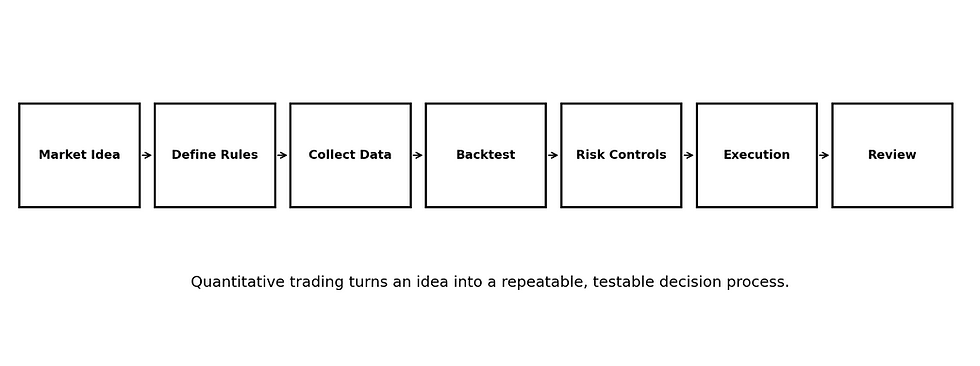
Define the trading hypothesis and convert it into explicit rules.
Choose and document the platform and account environment.
Confirm the symbol and execution specifications.
Implement the rules in an EA or other program.
Backtest using realistic assumptions.
Evaluate robustness and unseen data.
Run the strategy in a demo environment to verify operational behaviour.
Review logs, execution and discrepancies before making further changes.
Key Takeaways
Platform configuration is part of quantitative research because account and execution settings can change strategy behaviour.
MT5 is the operating environment; the broker, account, server and EA perform different roles.
A demo account is useful for functional testing and forward observation with virtual funds.
Use realistic account settings so leverage and oversized virtual balances do not hide poor risk design.
Record the exact server, account mode and symbol specifications used in each test.
Credentials and QR codes are sensitive and should not appear in public course materials.
Demo performance is not proof of live execution quality or future profitability.
A documented environment makes quantitative tests easier to reproduce and diagnose.
Educational Notice: This material is provided for educational purposes only. It explains general platform, demo-account and quantitative-research concepts and does not constitute investment advice, a personal recommendation or a guarantee of performance. Demo, simulated and historical results do not guarantee future outcomes. Trading, particularly with leveraged products, involves significant risk.


Comments